
GZone Factory
Production planning and shop-floor reporting for a furniture factory: CSV import of work orders, per-part routings, a capacity calendar across 20+ workstations, barcode reporting screens and live machine status.
The challenge
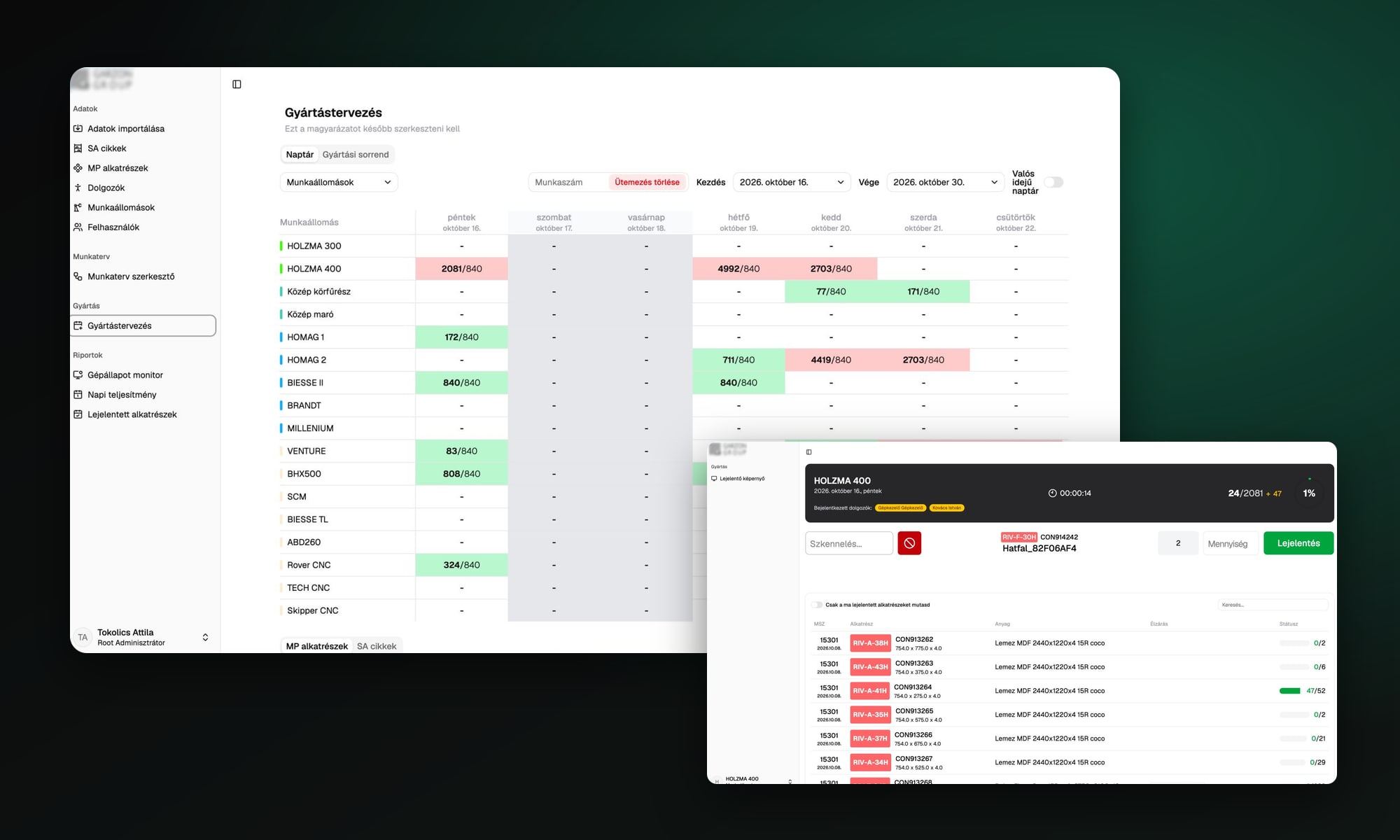
GZone Factory is a full-stack production planning and shop-floor reporting system for a furniture factory. It takes the parts and work orders exported from the factory's ERP, gives every part a routing through the machines, schedules the work backward from each deadline, and lets operators report finished quantities from a screen at their workstation.
A furniture order breaks down into thousands of parts, and each part visits a different chain of machines: cutting, edge banding, drilling, CNC. Planning that by hand left the factory with:
- No view of how much work was booked on each machine on each day
- Parts of the same work order cut on different days, although they have to go through the saw together
- A deadline change meant rescheduling every affected part by hand
- No reliable record of what was actually finished at each machine
- Managers walking the floor to find out which machines were running and which were waiting
The solution
One system from the ERP export to the last machine. Planners see every workstation's load per day and can move work with a click; operators scan a part, type a quantity and report it; managers watch the floor live.
Data Import
- CSV import of finished products and their parts, 20,000 to 30,000 rows per file
- All-or-nothing import: either the whole file is saved or none of it
- Routings are built from the imported data by background jobs in 1,000-row chunks
- Jobs are idempotent, so a retry never creates duplicates
Routing Editor
- Every part carries its own chain of workstations, shown as coloured tags per machine group
- Identical parts can be grouped and edited together
- Bulk workstation swap across the selected parts
- Configurable columns, search and sorting on every field
Planning Calendar
- Workstation by day grid showing planned quantity against daily capacity, green when it fits and red when it is overbooked
- Backward scheduling from each part's deadline in working days, weekends skipped
- All parts of a work order are cut on the same day, then each follows its own routing forward
- Move a part to another day or to another machine in the same machine group, with optional recalculation of its later steps
- A changed deadline replans the whole work order in one transaction
- Finished work is never touched by a replan
Production Sequence
- Daily order per workstation built from stackable sort rules: quantity, length, colour and more
- Rules can be reordered, reversed and removed, with a live preview of the resulting sequence
- Manual order is kept on top of the automatic one
Workstation Reporting Screen
- Each machine signs in with its own account and sees only its own queue
- Operators check in, scan a barcode or pick a part, enter the quantity and report it
- Header shows the day's progress, the running timer and who is signed in
- Queue is split into overdue, today and upcoming work
- Built-in PDF viewer opens the drawing of the part
Live Monitoring & Reports
- Machine status monitor: producing, waiting or idle, with the current part, elapsed time and operators
- Daily performance per machine group and per machine, finished against scheduled
- Reported parts log with filters
Platform
- Role-based access with CASL for administrators, planners and workstation accounts
- Validation schemas shared between API and frontend as one package
- All day-based logic runs in the factory's timezone, wherever the server is
- Response cache on Valkey with targeted invalidation
- Deployments through AWS CodePipeline, CodeBuild and CodeDeploy
Scope and scale
Planning, reporting and monitoring now run on the same data, from the ERP export to the last machine.
The planner sees at a glance which machines are overbooked and moves work before it becomes a problem. Parts of one work order reach the saw on the same day. Operators report what they finished at the machine, so the daily performance and the machine status screens show what is really happening on the floor.